
FPV can look simple from the outside: put on the goggles, take off, and start flying.
Then you begin looking into it.
There are drones, goggles, controllers, simulators, batteries, different FPV systems, and several ways to get started. Before long, a simple question—“How do I start FPV?”—turns into a dozen smaller ones.
The challenge is not that every part is unusually difficult on its own. It is that, as a beginner, you are trying to understand how everything fits together before you have enough experience to know which decisions actually matter first.
You do not need to figure it all out at once. For most beginners, a better approach is to experience FPV control in a simulator, decide how far they want to take it, and make bigger commitments as the next steps become clearer.
This guide will walk you through that journey—from your first simulator session to choosing your first FPV system and preparing for your first real flight.
The Recommended FPV Beginner Path
There is more than one way to get into FPV.
You could understand the basics, buy a drone, and start flying. Some people do exactly that, especially if they already have RC experience, someone experienced to help them, or a beginner-friendly kit that simplifies much of the setup and early decision-making.
But for most complete beginners, we recommend a more gradual path:
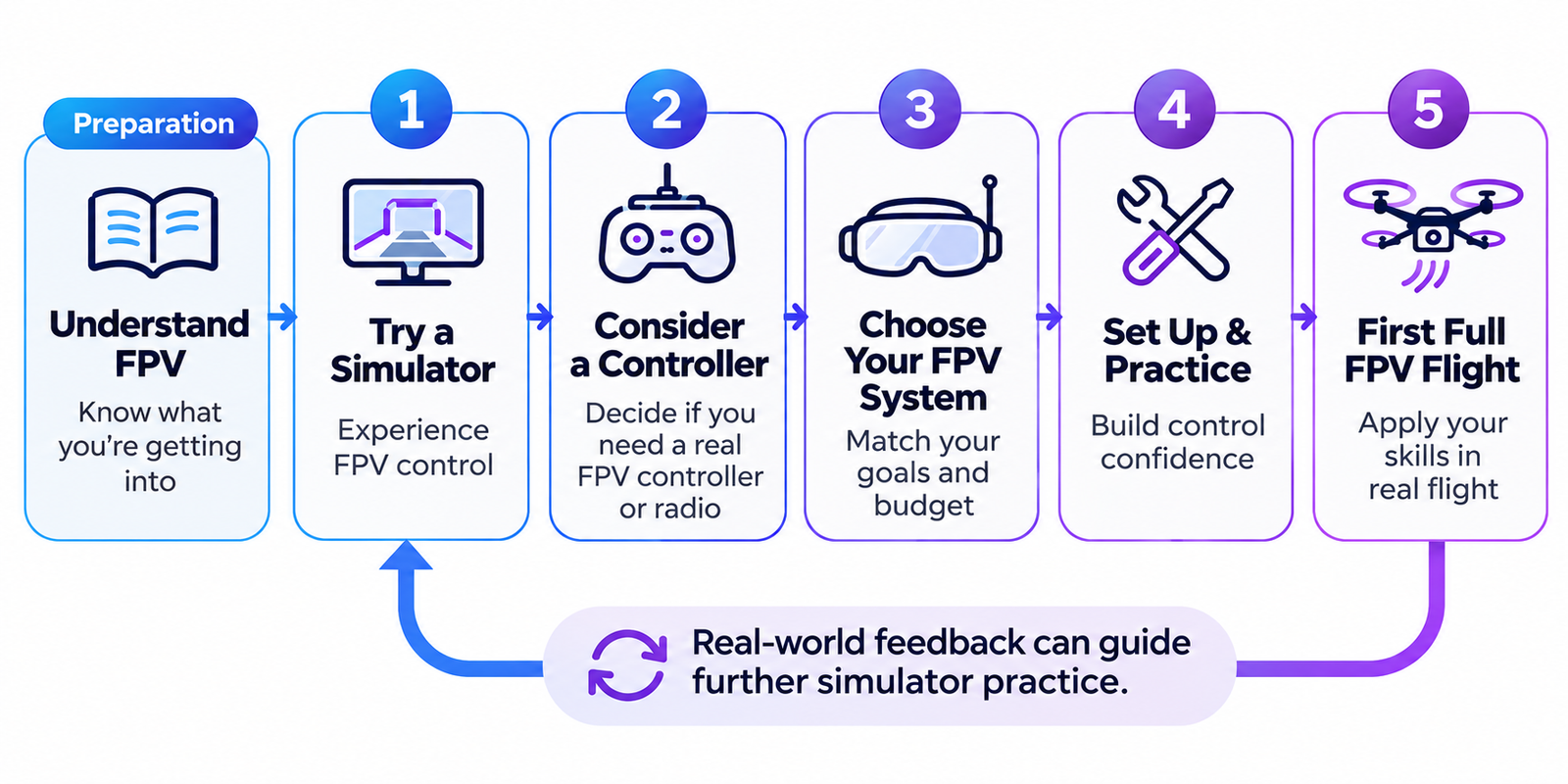
Understand FPV → Try a Simulator → Decide Whether You Need a Real Controller → Choose Your First FPV System → Set Up and Practice With the Real System → First Full FPV Flight
A simulator lets you experience the control style without risking a drone. A real FPV controller can make training more transferable if it fits the system you are likely to use later. By the time you choose your first FPV system, you are no longer buying based only on how exciting FPV looks—you have some experience to guide the decision.
That does not make this the only correct path. It simply makes it a lower-risk default for beginners who want to learn gradually, avoid unnecessary purchases, and make each decision with a little more confidence.
The best beginner path is not the fastest path to owning a drone. It is the path that reduces uncertainty before each bigger commitment.
Step 1: Try FPV in a Simulator
Before you buy a drone, it is worth finding out whether you actually enjoy the way FPV feels to control.
An FPV simulator gives you a low-risk way to do that. You do not need to learn advanced maneuvers to get a meaningful first impression. The four basic controls — throttle, yaw, pitch, and roll — are enough to show you what FPV control is really about.
Instead of simply telling the drone where to go, you are continuously coordinating those four inputs to manage its attitude, direction, and speed. Even basic forward flight and turning begin to show how the controls work together rather than as isolated commands.
A big part of that experience comes from Acro mode, the standard manual control mode for many FPV quadcopters, especially in freestyle and racing. Unlike a self-leveling mode, the drone does not automatically return to level when you release the sticks. Roll, pitch, and yaw inputs control how quickly it rotates around each axis. Centering those sticks stops commanding further rotation, but does not bring the aircraft back to level.
That is why Acro is so useful to experience in a simulator: you must actively make small corrections to manage the aircraft’s attitude and keep the flight going where you want.
You do not need to buy a dedicated controller just to start. If your simulator supports it, a keyboard or a gamepad you already own can be enough for an initial trial. The goal at this stage is not perfect realism. It is to experience that control logic, feel the learning curve for yourself, and decide whether you want to go further.
Choose the simulator entry that matches your goal:
- Just want to try FPV for free? Start with a free FPV simulator.
- Already know you want to practice seriously? Compare the best FPV simulators for longer-term training.
- Mainly interested in racing? Start with an FPV racing simulator built around tracks, speed, and racing lines.
Once you start practicing, pay attention to more than whether you can keep the drone in the air. Notice how throttle, yaw, pitch, and roll have to work together, how often you need to make small corrections, and whether you enjoy that kind of continuous control.
If you finish a few sessions thinking, “I want to keep going, but I also want controls that feel closer to a real FPV setup,” then you are ready for the next decision: whether it makes sense to move to a real FPV controller or radio.
Step 2: Decide Whether You Need a Real FPV Controller
If a few simulator sessions leave you wanting to continue, the next question is not automatically, “Which controller should I buy?”
A keyboard or gamepad can be enough for an initial trial, but there are a few different ways to move closer to real FPV control.
One option is a simulator-only controller designed mainly for training rather than real FPV flight. It can give you a more radio-like stick layout and feel, but its usefulness may end at the simulator.
Another option is a real FPV controller, often called a radio. Many FPV radios can also be used for simulator practice and, if you choose the right one, later with a real FPV drone as well. That makes it more useful for building control habits that can carry forward.
But buying one early only makes sense if it fits the path you are likely to take next.
If you are still experimenting, there is nothing wrong with continuing to use the equipment you already have. If you are leaning toward a ready-to-fly or beginner kit, check whether the kit already includes a conventional twin-stick controller and whether that controller can also be used with the simulator you want to train in. If it can, waiting may help you avoid buying the same function twice.
If you already know you want to choose your controller, goggles, and drone separately, buying a real radio earlier can make more sense. The important thing is to choose one that can still fit the FPV system you are likely to build later—not just one that works well in a simulator.
You do not need to understand every protocol or compatibility rule yet. Before buying, use a controller guide to check which radios work with the kinds of receivers, drones, and ecosystems you are considering, and whether the controller is something you can keep using as your setup grows.
At this stage, the most useful controller is not simply the one that feels most realistic in a simulator. It is the one that fits your training needs now and your likely FPV system later.
If that path is still unclear, keep practicing and make the controller decision alongside your first FPV system. If it is clear, moving to a real radio can be a sensible next step.
Either way, the next major decision is the same: choosing the FPV system you actually want to fly.
Step 3: Choose Your First FPV System
By this point, you should have a much better sense of what FPV actually feels like and whether you want to keep going.
That changes the buying decision.
At the beginning, it is easy to think, “I just need to find the best FPV drone.” But your first FPV system should fit the way you want to fly, how much complexity you want to deal with, and how much you are willing to invest now versus later.
Start with three questions.
What do you want to do with FPV?
Are you mainly looking for an easy first experience, freestyle, racing, or a more cinematic and immersive way to fly?
Your answer helps define the kind of system that makes sense before you start comparing individual products.
If you want an approachable start with an immersive flying experience and room to grow, a beginner-friendly FPV drone may be the right place to start. If you already know you want to freestyle or race, it makes more sense to explore systems built around those goals instead of forcing a general beginner setup to fit them.
How much setup and complexity do you want?
Some beginners prefer an all-in-one kit that gets the drone, goggles, and controller working together with as little friction as possible.
Others are comfortable choosing those pieces separately in exchange for more flexibility, compatibility options, and room to upgrade later.
If you want a complete setup that also makes your earliest flights feel more manageable, a beginner-focused FPV kit with assisted flight modes may be a practical starting point. If you would rather choose your own controller, goggles, and drone, a more modular route may suit you better.
Neither path is automatically better. The right one depends on how much setup and system-building you actually want to take on.
What is your budget and growth path?
A lower-cost entry can make sense if you are still testing how deeply you want to get into FPV.
If you already know you want to keep flying, it can be worth thinking beyond the first purchase: whether the controller, goggles, and other major parts can continue to serve you as your setup grows.
If keeping the first investment low matters most, start with a budget-oriented route. If you are comfortable spending more now to reduce replacement later, give more weight to compatibility, upgrade room, and long-term reuse.
The goal is not to buy the most capable system you can afford. It is to choose the system that best matches your current goals without creating unnecessary complexity or forcing you to replace everything too soon.
Once you have chosen that first system, the next step is no longer deciding what to buy. It is getting the real equipment ready, checking that everything works as expected, and practicing safely before your first full flight.
Step 4: Set Up and Practice With the Real FPV System
Buying your first FPV system does not mean you are ready to launch it immediately.
The next step is to make sure the system works as a complete setup, then give yourself time to transfer what you learned in the simulator into the real world.
Start by getting the main pieces ready: the drone, controller or radio, goggles, batteries, and charger. Make sure they connect and operate as expected before you think about a full flight.
Then do a few basic checks. Confirm that the controls respond in the correct direction, the video feed is working properly, the battery is in good condition, and the aircraft has no obvious damage or loose parts. Any basic safety settings your system depends on should also be confirmed before takeoff.
Once the system is ready, keep the first practice simple. Focus on basic takeoffs and landings, slow controlled movement, maintaining a steady heading and simple flight path, and gentle turns. The goal is not to prove that your simulator practice worked perfectly. It is to learn where the real aircraft feels different.
You may notice differences in throttle response, stick feel, video latency, wind, or simply the pressure of knowing that a mistake now has real consequences. Those differences are exactly why this transition stage matters.
If something still feels unstable, you do not have to keep risking the real drone just to practice it. Go back to the simulator with your controller, work on that specific weakness in a low-risk environment, then return to the real system and try again.
Once you can operate the system confidently at a basic level and the aircraft is behaving as expected, you are ready for your first full FPV flight.
Step 5: Take Your First Full FPV Flight
By this point, you have already reduced a lot of the uncertainty that makes FPV feel intimidating at the beginning.
You have tried the controls in a simulator, decided how seriously you want to continue, chosen your first FPV system, and spent some time getting comfortable with the real equipment.
Now the goal is not to show how much you have learned. It is to turn that preparation into a simple, controlled real-world flight.
Before your first flight, check local flying rules, including visual-line-of-sight and observer requirements when using FPV goggles. In the U.S., see the FAA’s recreational drone guidelines.
Choose an open, permitted practice area with few people or obstacles and mild conditions. Keep your first flight short and simple.
Focus on smooth takeoffs, straight flight, wide turns, gentle altitude changes, and a controlled return and landing.
Do not rush into freestyle tricks, fast low-altitude flying, tight gaps, or aggressive racing lines just because you were able to practice them in a simulator.
Pay attention to the differences you notice in real flight.
Does the throttle feel more sensitive than expected? Does wind change the way the aircraft holds its line? Does video latency or the view through the goggles affect your timing? Does the risk of damaging real equipment make you more cautious or change the way you fly?
Those differences are useful feedback.
If a particular control or maneuver still feels uncertain, take that problem back to the simulator and practice it with your controller in a low-risk environment. Then return to the real aircraft and see whether the improvement carries over.
Your first real FPV flight is not the finish line. It is the beginning of a feedback loop between simulator practice and real-world flying.
From here, your path can become more personal: keep building general control skills, move toward freestyle, train for racing, explore cinematic flying, or begin learning more about setup, tuning, and maintenance.
Which FPV Path Fits You Right Now?
You do not need to follow every step in exactly the same way. The important thing is to identify where you are now and take the next step that reduces the most uncertainty.
- Never tried FPV controls? Start with a simulator. Review Step 1
- Tried a simulator but still unsure? Keep practicing with the equipment you already have.
- Enjoy simulator flying and want more realistic controls? Decide whether a real FPV radio fits your future setup. Review Step 2
- Ready to buy your first FPV system? Choose based on your flying goals, preferred complexity, and budget. Review Step 3
- Already own an FPV system? Complete the setup and basic practice before your first full flight. Review Step 4
- Already flying? Use real-world feedback to guide further simulator practice and skill development.
The right starting point depends on where you are now—not on completing every step again.
Common Beginner Mistakes to Avoid
A good beginner path is not about following rules for the sake of it. It is about avoiding decisions that add risk, cost, or complexity before you are ready for them.
Buying a drone before you know whether you enjoy FPV
It is tempting to start by choosing the drone that looks the most exciting. But if you have never experienced FPV control, you are making one of the biggest commitments before answering a more basic question: do you actually enjoy the way FPV feels to fly?
A simulator lets you answer that first with much less risk.
Treating simulator success as proof that you are ready for real flight
Simulator practice is valuable, but it does not remove every difference between virtual and real flying.
Wind, video latency, real hardware response, physical surroundings, and the consequences of a crash can all change the way you fly. Think of simulator skill as preparation, not a guarantee that the real aircraft will feel the same.
Buying a controller without thinking about the system that comes next
A controller can be a smart early purchase, but only if it still makes sense later.
If your future kit already includes a controller, or the radio you buy now does not fit the protocol or ecosystem of the FPV system you eventually choose, you may end up paying twice.
The best early controller purchase is one that fits both your training needs and your likely future setup, so check controller compatibility before choosing a radio.
Abandoning the simulator once you own a real FPV system
A simulator is not only a tool for people who do not own a drone yet.
Once you begin flying for real, it becomes a low-risk place to work on the things that still feel uncomfortable. If a turn, maneuver, or control habit is giving you trouble in the real world, practice it repeatedly in the simulator with your controller, then bring it back to the real aircraft.
That practice loop can remain useful long after your first flight.
Skipping a step only makes sense when the uncertainty that step was meant to reduce has already been resolved.
What Should You Do Next?
You do not need to figure out every part of FPV today. Start with the step that matches your current experience, and move forward as each decision becomes clearer.
If something still feels uncertain along the way, you can return to the simulator and practice with the controls you have without risking your real equipment. Each step should help you make the next decision with greater confidence.